Source of truth
This page is included from projects/2026-maxam-fxlms-filter/README.md. Edit it there.
FXLMS ANC Demo
Fixed-point filtered-x LMS active-noise-control demo for a future STM32H5 port. The C core implements the adaptive controller and the Python harness builds a repeatable microphone scenario: a synthetic drone reference is propagated through a primary acoustic path, an optional useful WAV signal is mixed into the microphone input, and the FXLMS loop tries to remove only the drone component.
Quick Start
Run the current WAV scenario:
Generated run artifacts are written to python/out/. Build products are
written to build/.
Example Output
These images were generated with the current config and:
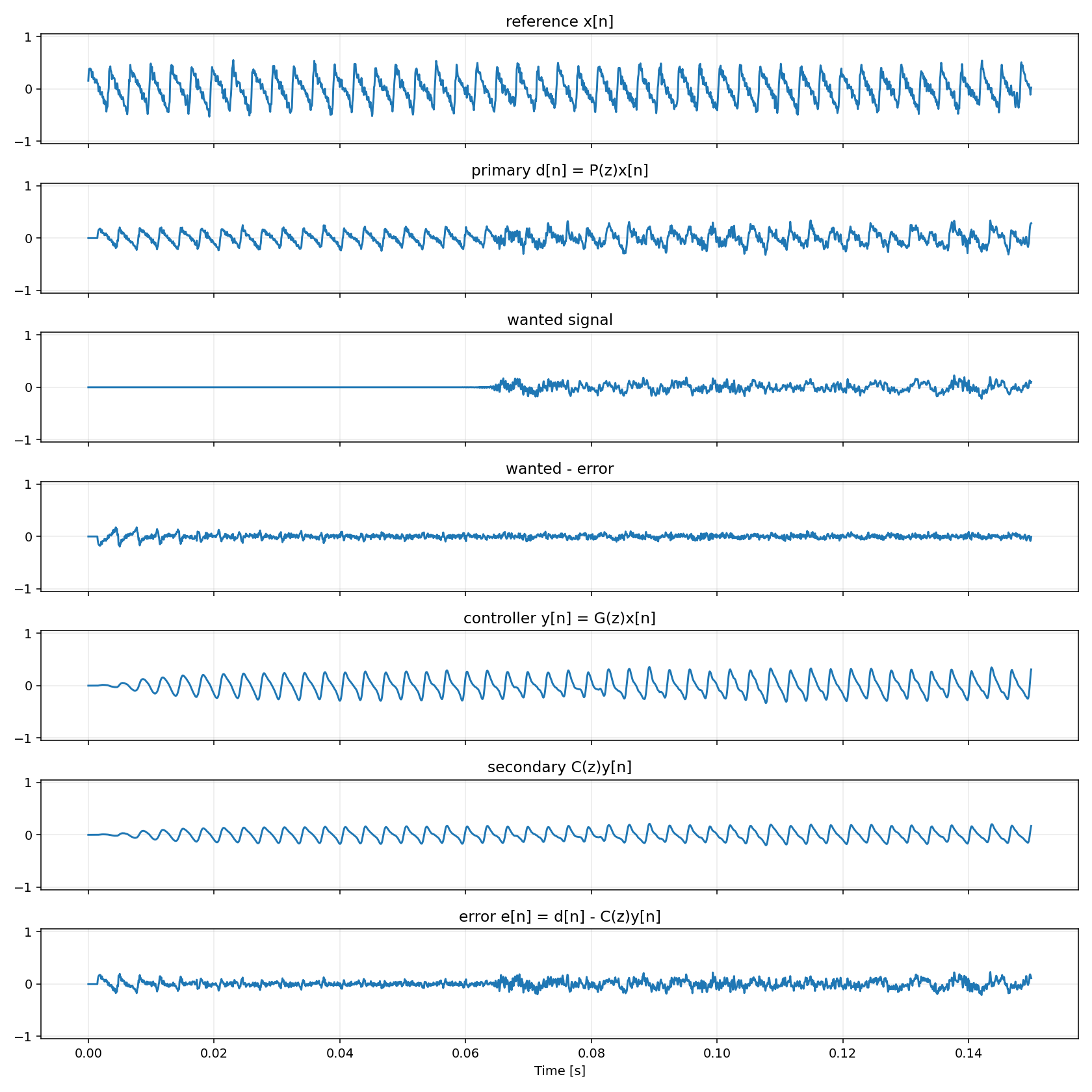
The time-domain plot uses the default plot window 0..0.15 s; --duration-s
controls the simulated audio length, while --plot-window controls the visible
time window in this figure.
The spectral plot is computed after the initial settling window. It shows whether the ANC output spectrum moved closer to the wanted signal than the noisy microphone input did.
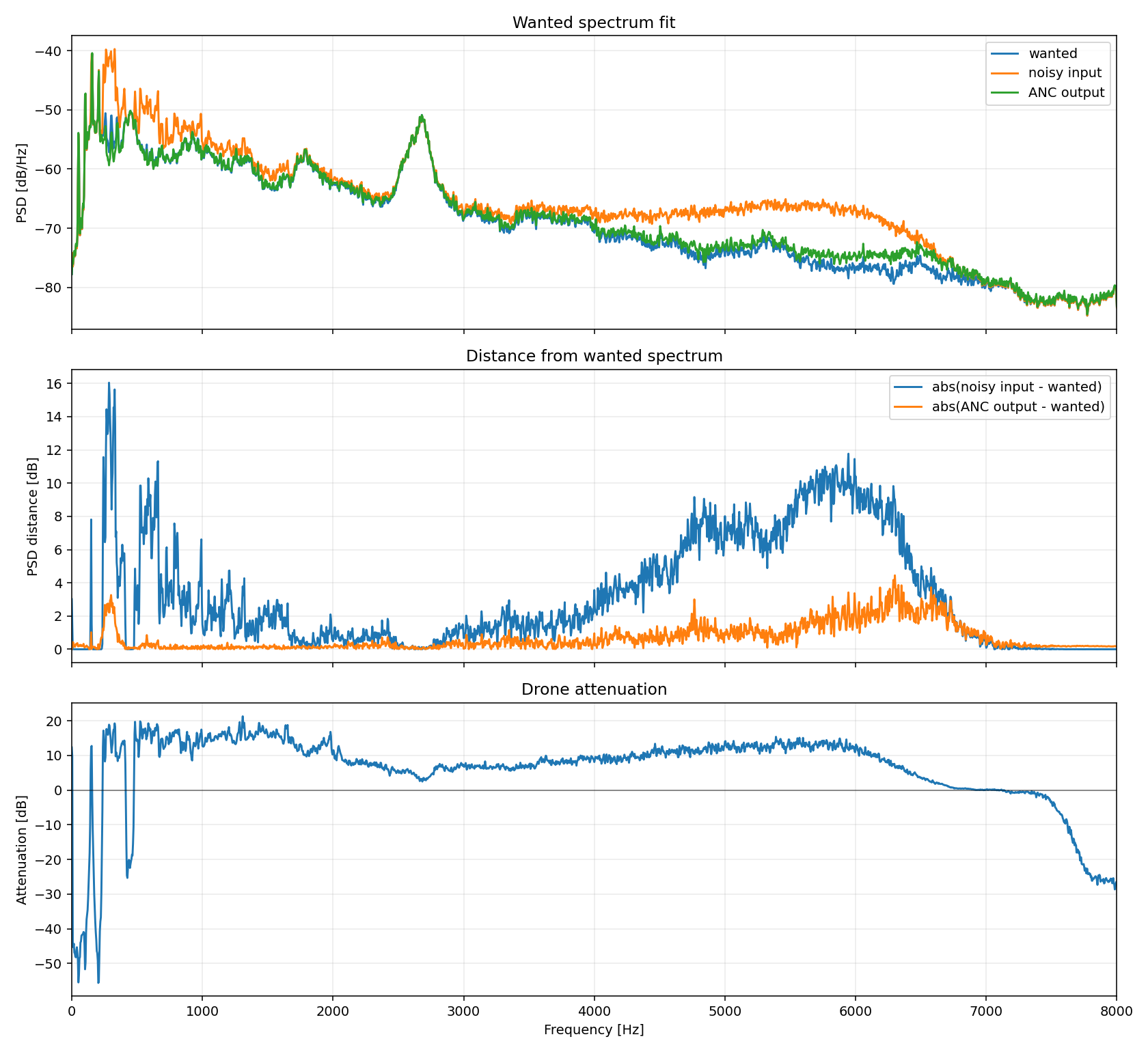
Current metrics from that run:
{
  "primary_tail_mse": 0.016708899582089442,
  "error_tail_mse": 0.006398031285252526,
  "drone_primary_tail_mse": 0.010197285773336059,
  "noise_residual_tail_mse": 0.000457147099957284,
  "drone_attenuation_tail_db": 13.484286212956949,
  "plot_start_s": 0.0,
  "plot_end_s": 0.15
}
CLI Parameters
All demo parameters are passed after task run --.
| Parameter | Default | Meaning |
|---|---|---|
--lib-path PATH |
build/liblms_filter.so |
Shared library loaded by the Python harness. Run task build first if it is missing. |
--output-dir PATH |
python/out |
Directory for WAVs, plots, and metrics.json. |
--fs HZ |
16000 |
Simulation sample rate. Input WAVs are resampled to this rate. |
--duration-s SEC |
4.0 |
Total simulation length. The synthetic drone and all output WAVs have this duration. A wanted WAV is cropped or zero-padded to this length. |
--seed N |
7 |
RNG seed for the synthetic drone turbulence/noise component. |
--reference-gain GAIN |
1.0 |
Gain applied to the drone reference x[n] before it enters the C FXLMS core. |
--wanted-wav PATH |
unset | Optional useful audio to preserve. Without it, the demo runs drone-only. |
--wanted-gain GAIN |
0.35 |
Gain applied after normalizing the wanted WAV. Increase it to make the useful signal louder relative to the drone. |
--mode MODE |
siso |
Processing mode: siso, sum-first, or miso. |
--reference-count N |
4 |
Number of synthetic motor references for sum-first and miso; valid range is 1..4. |
--actuator-count N |
4 |
Number of actuator outputs for sum-first and miso; valid range is 1..4. |
--plot-window WINDOW |
0..0.15 |
Time-domain plot window for fxlms_demo.png. Accepts either a duration like 2 or an interval like 1.5..2. |
--spectrum-window WINDOW |
post-settling tail | Window used for fxlms_spectrum.png and tail metrics. Accepts the same format as --plot-window. |
--plot-duration-s SEC |
unset | Deprecated alias for --plot-window SEC, kept for old commands. |
--multi-channel-comparison |
false | Run the synthetic 4-motor/4-actuator comparison instead of the SISO demo. |
--no-wav |
false | Skip writing WAV artifacts. Plots and metrics are still written. |
Examples:
# Drone-only demo, default 4 s simulation and 0..0.15 s time plot.
task run

# Use 10 s from a wanted WAV, preserving the default short plot window.
task run -- --wanted-wav audio/tank-moving.wav --wanted-gain 0.35 --duration-s 10

# Plot the first 2 s in fxlms_demo.png.
task run -- --wanted-wav audio/tank-moving.wav --duration-s 10 --plot-window 2

# Plot only the 1.5..2.0 s interval.
task run -- --wanted-wav audio/tank-moving.wav --duration-s 10 --plot-window 1.5..2

# Plot and analyze a sparse event window, such as a gunshot.
task run -- --wanted-wav audio/gunshot-vs-firecracker.wav --duration-s 10 --plot-window 5..6 --spectrum-window 5..6

# Put outputs somewhere else.
task run -- --output-dir /tmp/fxlms-run --wanted-wav audio/tank-moving.wav

# Compare summed-reference and multi-reference 4-actuator FxLMS modes.
task run -- --multi-channel-comparison --output-dir python/out/multi

# Run only one multi-channel mode.
task run -- --mode miso --reference-count 4 --actuator-count 4
task run -- --mode sum-first --reference-count 4 --actuator-count 4
Signal Model
The Python harness owns the simulated acoustic scene. The C library owns the adaptive FXLMS loop.
flowchart LR
    subgraph Python["Python harness"]
        R["Synthetic drone reference x[n]"]
        P["Primary path P(z)<br/>delay + FIR"]
        Dp["drone_primary[n]"]
        Wav["wanted WAV"]
        Cond["mono + resample + crop/pad<br/>normalize + wanted_gain"]
        W["wanted[n]"]
        Mix["primary_d[n] = drone_primary[n] + wanted[n]"]

        R --> P --> Dp --> Mix
        Wav --> Cond --> W --> Mix
    end

    subgraph C["C FXLMS core"]
        G["Adaptive controller G(z)"]
        Cpath["Secondary path C(z)"]
        Chat["Secondary estimate C_hat(z)"]
        XF["filtered_x[n]"]
        E["error_e[n] = primary_d[n] - secondary_output[n]"]
        Update["LMS weight update<br/>uses error_e[n] and filtered_x[n]"]

        R --> G --> Y["controller_y[n]"] --> Cpath --> S["secondary_output[n]"] --> E
        Mix --> E
        R --> Chat --> XF --> Update
        E --> Update --> G
    end

    E --> Out["error.wav<br/>wanted + residual drone"]
    E --> Resid["noise_residual = error - wanted"]
    W --> Resid
Mapping:
x[n]: drone reference signal. In this demo it is synthetic and intentionally harmonic/periodic, with RPM drift and turbulence.P(z): simulated primary acoustic path from drone/reference pickup to the error microphone. Implemented in Python as delay plus a short FIR.wanted[n]: optional useful WAV audio that should remain in the output.primary_d[n]: microphone input before ANC; this is the noisy signal.G(z): adaptive FIR controller implemented in C.C(z): simulated secondary path from controller/speaker output to the error microphone.C_hat(z): secondary-path estimate used only for the filtered-x adaptation branch.error_e[n]: microphone residual after subtracting the anti-noise. In WAV mode this should contain the wanted signal plus as little drone as possible.noise_residual: analysis signal computed aserror - wanted; this isolates the remaining drone component.
All FIRs use newest-sample-first tap order: tap i multiplies sample n - i.
This convention is shared by G(z), C(z), C_hat(z), and P(z).
WAV Handling
When --wanted-wav is set:
- The file is loaded with
scipy.io.wavfile.read. - Integer PCM is converted to centered
float32; floating-point WAVs are used as float data. - Multi-channel audio is averaged to mono.
- Audio is resampled to
--fswhen needed. - Audio is cropped or zero-padded to exactly
--duration-s. - Audio is normalized to a safe peak and scaled by
--wanted-gain. - The final microphone input is
primary_d = drone_primary + wanted.
--duration-s therefore sets both the simulation length and the amount of
wanted WAV used. It does not set the time window shown in fxlms_demo.png; use
--plot-window for that.
Generated Files
| File | Written when | Meaning |
|---|---|---|
metrics.json |
always | Numeric MSE, attenuation, plot paths, gains, and plot window metadata. |
fxlms_demo.png |
always | Time-domain view of selected signals. Controlled by --plot-window. |
fxlms_spectrum.png |
always | Welch PSD comparison and frequency-dependent attenuation after settling. |
reference.wav |
unless --no-wav |
Drone reference x[n]. |
primary_d.wav |
unless --no-wav |
Noisy microphone input before ANC. |
controller_y.wav |
unless --no-wav |
Output of adaptive controller G(z) before the secondary path. |
secondary_output.wav |
unless --no-wav |
Anti-noise after simulated secondary path C(z). Compare this with drone_primary, not raw controller_y. |
error.wav |
unless --no-wav |
ANC output: wanted signal plus residual drone. |
wanted.wav |
WAV mode only | Conditioned wanted audio actually used by the simulation. |
drone_primary.wav |
WAV mode only | Drone component at the microphone before ANC. |
noise_residual.wav |
WAV mode only | error - wanted, used to measure remaining drone. |
In multi-channel comparison mode the output directory instead contains
sum_first_error.wav, multi_ref_error.wav, per-mode secondary sums, and a
metrics.json comparing tail MSE/attenuation for summed-reference and
multi-reference modes.
Plot Interpretation
fxlms_demo.png includes:
reference x[n]: synthetic drone reference.primary d[n]: microphone input before ANC.wanted signal: useful WAV, shown only in WAV mode.wanted - error: signed output error relative to the useful signal. This is the inverse sign ofnoise_residual.controller y[n]: controller output before the secondary path.secondary C(z)y[n]: actual anti-noise at the microphone afterC(z).error e[n]: resulting microphone signal after ANC.
fxlms_spectrum.png includes:
- Top panel:
wanted, noisy input, and ANC output spectra. The ANC output should move closer towantedthan the noisy input. - Middle panel: absolute spectral distance from
wanted, before and after ANC. - Bottom panel: drone attenuation by frequency, computed from
drone_primaryandnoise_residualPSDs in dB.
Metrics
Important metrics.json fields:
primary_mse: total input energy before ANC.error_mse: total output energy after ANC. In WAV mode this includes wanted audio, so it is not a pure noise metric.primary_tail_mseanderror_tail_mse: same as above, but after the settling window.drone_primary_tail_mse: drone-only microphone energy before ANC, after settling.noise_residual_tail_mse: remaining drone energy after ANC, after settling.drone_attenuation_tail_db: drone reduction in dB. This is the main noise suppression metric in WAV mode.plot_start_s,plot_end_s,plot_duration_s: time window used forfxlms_demo.png.spectrum_start_s,spectrum_end_s,spectrum_duration_s: time window used forfxlms_spectrum.pngand tail metrics.
The settling window is min(total_samples / 2, 1 second). Spectral plots and
tail metrics use the samples after that point unless --spectrum-window is set.
Multi-Channel Prototype
The C core supports up to 4 references and 4 actuator outputs with one error microphone. The adaptive controller is a matrix of FIR filters: each actuator output is the sum of one adaptive FIR per reference. The per-actuator secondary path outputs are then summed into the single residual error signal.
The legacy SISO API remains valid. New code can set reference_count and
actuator_count in struct fxlms_config, then call
fxlms_process_multi_block(). Multi-channel reference, controller, and
secondary buffers are channel-major: channel c, sample i is stored at
buffer[c * n + i].
The Python comparison mode generates four similar but non-identical synthetic motors and runs:
sum-first: four motor references are summed before FxLMS, then drive four actuator filters.multi-ref: all four references are kept separate and drive the full 4x4 controller matrix.
Configuration
The default C configuration comes from sdkconfig.defaults and Kconfig:
CONFIG_FXLMS_SAMPLE_RATE_HZ=16000
CONFIG_FXLMS_TAPS=64
CONFIG_FXLMS_MU_Q15=256
CONFIG_FXLMS_ADAPT_SHIFT=0
CONFIG_FXLMS_OUTPUT_LIMIT=32767
Useful tasks:
task config: generatebuild/generated/fxlms_config.hfromKconfigandsdkconfig.defaults.task menuconfig: edit local FXLMS Kconfig values through the installedesp-idf-kconfigmenuconfig UI.task kconfig:check: validateKconfigformatting.
The controller update is:
Increase CONFIG_FXLMS_MU_Q15 for faster adaptation. If the output saturates or
the filter becomes unstable, reduce CONFIG_FXLMS_MU_Q15 or increase
CONFIG_FXLMS_ADAPT_SHIFT.
Embedded Notes
The functions in csrc/lms_filter.h are the intended STM32-facing API:
- Call
fxlms_state_size()once for the chosen config. - Allocate the returned number of bytes statically or from a controlled memory region.
- Call
fxlms_init()and feed DMA-sized blocks throughfxlms_process_block(). - Keep input PCM signed and centered around zero. If a peripheral path produces offset binary samples, subtract the midpoint before calling the FXLMS code.
fxlms_filter_i16() is a host convenience wrapper for Python and is not the
preferred embedded entry point because it allocates memory internally.